3. A camera that follows
The camera has stood still so far. In this part it follows the player and turns with the mouse, and the player learns to walk where the camera looks.
See what a camera sees
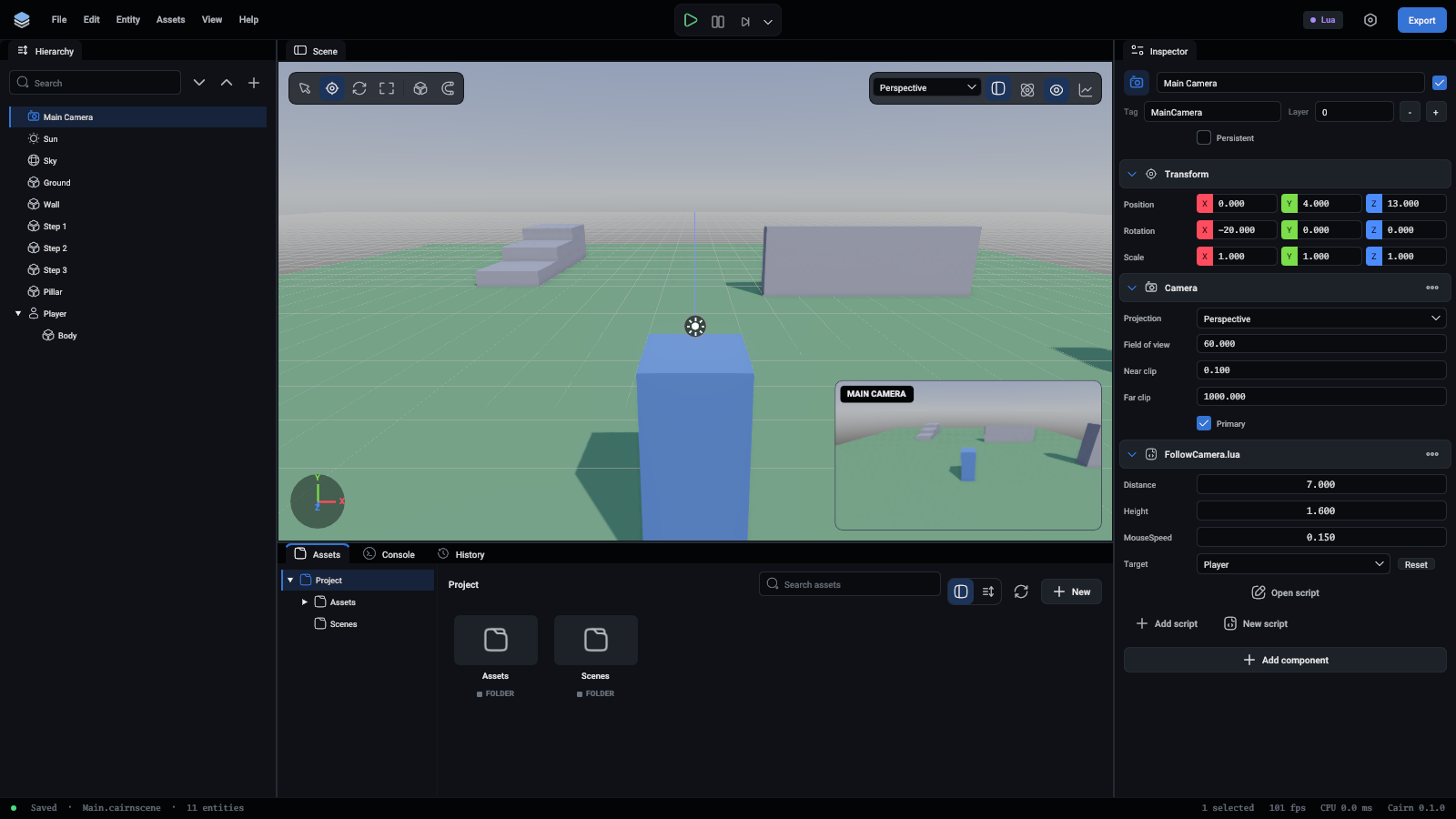
Select Main Camera in the Hierarchy. A small picture in the corner of the viewport shows what it sees, and lines in the scene show its view. Move or turn the camera and the picture follows. That is how to frame a shot without pressing Play.
The camera script
- With Main Camera selected, press Add Component and choose Scripts, then New script.
- In the Assets panel, rename the new
Main Camera.lua to FollowCamera.lua: right-click it and choose Rename.... The entity keeps its script, because it refers to the file by ID.
- Open it and replace its contents:
-- A third-person camera: stays behind and above its target and turns with the mouse.
---@class FollowCamera : Script
local FollowCamera = {}

FollowCamera.Fields = {
	Target = Field.Entity({ Tip = "What the camera follows" }),
	Distance = 7,
	-- How far above the target's feet it looks.
	Height = 1.6,
	-- Degrees per pixel of mouse movement.
	MouseSpeed = 0.15,
}

function FollowCamera:OnStart()
	self.Yaw = 0
	self.Pitch = -20
	Input.SetCursorLocked(true)
end

function FollowCamera:OnUpdate()
	-- Escape gives the mouse back, and takes it again.
	if Input.WasKeyPressed("Escape") then
		Input.SetCursorLocked(not Input.IsCursorLocked())
	end
	if Input.IsCursorLocked() then
		local dx, dy = Input.GetMouseDelta()
		self.Yaw = self.Yaw - dx * self.MouseSpeed
		self.Pitch = math.clamp(self.Pitch - dy * self.MouseSpeed, -70, 10)
	end

	self.Entity.Rotation = Vec3(self.Pitch, self.Yaw, 0)
	local lookAt = self.Target.Position + Vec3(0, self.Height, 0)
	local back = -self.Entity.Forward

	-- Come closer when something solid is between the camera and the target.
	local distance = self.Distance
	local hit = Physics.Raycast(lookAt, back, distance, self.Target)
	if hit then
		distance = math.max(hit.Distance - 0.2, 0.6)
	end
	self.Entity.Position = lookAt + back * distance
end

return FollowCamera
// A third-person camera: stays behind and above its target and turns with the mouse.
export = DefineScript({
	Fields: {
		Target: Field.Entity({ Tip: "What the camera follows" }),
		Distance: 7,
		// How far above the target's feet it looks.
		Height: 1.6,
		// Degrees per pixel of mouse movement.
		MouseSpeed: 0.15,
	},

	Yaw: 0,
	Pitch: -20,

	OnStart() {
		this.Yaw = 0;
		this.Pitch = -20;
		Input.SetCursorLocked(true);
	},

	OnUpdate() {
		// Escape gives the mouse back, and takes it again.
		if (Input.WasKeyPressed("Escape")) {
			Input.SetCursorLocked(!Input.IsCursorLocked());
		}
		if (Input.IsCursorLocked()) {
			const [dx, dy] = Input.GetMouseDelta();
			this.Yaw = this.Yaw - dx * this.MouseSpeed;
			this.Pitch = math.clamp(this.Pitch - dy * this.MouseSpeed, -70, 10);
		}

		const target = this.Target;
		if (!target) {
			return;
		}
		this.Entity.Rotation = Vec3(this.Pitch, this.Yaw, 0);
		const lookAt = target.Position.add(Vec3(0, this.Height, 0));
		const back = this.Entity.Forward.unm();

		// Come closer when something solid is between the camera and the target.
		let distance = this.Distance;
		const hit = Physics.Raycast(lookAt, back, distance, target);
		if (hit) {
			distance = Math.max(hit.Distance - 0.2, 0.6);
		}
		this.Entity.Position = lookAt.add(back.mul(distance));
	},
});
- Save it, and select Main Camera again. Under Scripts there is now a Target box. Drag Player from the Hierarchy onto it, or pick Player from its list.
Press Play. The mouse turns the camera and the camera stays behind the player. Press Escape to get the mouse back.
What the script says
Target = Field.Entity(...) is a field that holds another entity. In the inspector it is a box you fill in. In the script, self.Target is that entity. This is the usual way for one entity to know about another: no searching by name, and the link is visible in the editor.
The camera keeps two angles: Yaw turns it left and right, Pitch tips it up and down. Each frame it:
- Adds the mouse's movement to the angles.
math.clamp keeps the pitch between looking steeply down and slightly up, so the camera cannot flip over.
- Sets its own rotation from the angles. Rotations are in degrees, about X, Y and Z.
- Works out the point to look at: the target's position, raised to about shoulder height.
- Steps back from that point, along the opposite of the way it faces, by
Distance.
self.Entity.Forward is the direction an entity faces, so -self.Entity.Forward is straight behind it. TypeScript has no minus for vectors, so it writes this.Entity.Forward.unm(), and a.add(b) and b.mul(distance) for a + b and b * distance. In the TypeScript version the target can be missing, so the camera checks first and does nothing without one.
Walls
Without the last part, the camera would go through the wall when the player stands in front of it. Physics.Raycast asks what is on a line: from the look-at point, backwards, as far as the camera wants to be. If something solid is in the way, the camera stops just short of it.
The last argument, self.Target, tells the ray to ignore the player. A ray that starts inside a body hits that body at once, and the look-at point is inside the player.
Walk where the camera looks
Now that the camera turns, pressing W should mean "away from the camera", not "towards -Z". Open Player.lua and change the start of OnUpdate:
	-- Which way is forward depends on where the camera is, so take it from the camera,
	-- flattened so that looking down does not push the player into the ground.
	local forward = self.Camera.Forward:Flat():Normalized()
	local right = self.Camera.Right:Flat():Normalized()

	local move = right * Input.GetValue("MoveX") - forward * Input.GetValue("MoveZ")
export = DefineScript({
	Fields: { Camera: Field.Entity() },

	OnUpdate() {
		const controller = this.Entity.CharacterController;
		const camera = this.Camera;
		if (!controller || !camera) {
			return;
		}

		// Which way is forward depends on where the camera is, so take it from the camera,
		// flattened so that looking down does not push the player into the ground.
		const forward = camera.Forward.Flat().Normalized();
		const right = camera.Right.Flat().Normalized();

		let move = right.mul(Input.GetValue("MoveX")).sub(forward.mul(Input.GetValue("MoveZ")));
	},
});
Add the field, and select the player to fill it in with Main Camera:
Camera = Field.Entity({ Tip = "Forward is away from this camera" }),
const Fields = {
	Camera: Field.Entity({ Tip: "Forward is away from this camera" }),
};
Flat() drops the up and down part of a direction. The camera looks down at the player, so its forward points into the ground. Flattened and brought back to length 1, it is the direction along the ground.
One last touch: a player who falls off the edge should come back. Remember where the player started in OnStart, and check the height at the end of OnUpdate. Here is the finished script:
-- The player's character: walks where the camera looks, runs and jumps.
---@class Player : Script
local Player = {}

Player.Fields = {
	-- Units per second.
	WalkSpeed = 4.5,
	RunSpeed = 8,
	JumpSpeed = Field.Number(6.5, { Min = 0, Max = 15 }),
	Camera = Field.Entity({ Tip = "Forward is away from this camera" }),
}

function Player:OnStart()
	self.Controller = self.Entity.CharacterController
	self.Home = self.Entity.Position
end

function Player:OnUpdate()
	-- Which way is forward depends on where the camera is, so take it from the camera,
	-- flattened so that looking down does not push the player into the ground.
	local forward = self.Camera.Forward:Flat():Normalized()
	local right = self.Camera.Right:Flat():Normalized()

	local move = right * Input.GetValue("MoveX") - forward * Input.GetValue("MoveZ")
	-- Two keys at once must not be faster than one.
	if move:Length() > 1 then
		move = move:Normalized()
	end

	local speed = Input.IsDown("Run") and self.RunSpeed or self.WalkSpeed
	self.Controller:Move(move * speed)

	-- Face the way it walks.
	if move:Length() > 0.1 then
		self.Entity:Face(move)
	end

	if Input.WasPressed("Jump") then
		self.Controller:Jump(self.JumpSpeed)
	end

	-- Fell off the level: back to where it started.
	if self.Entity.Position.y < -10 then
		self.Entity.Position = self.Home
	end
end

return Player
// The player's character: walks where the camera looks, runs and jumps.
export = DefineScript({
	Fields: {
		// Units per second.
		WalkSpeed: 4.5,
		RunSpeed: 8,
		JumpSpeed: Field.Number(6.5, { Min: 0, Max: 15 }),
		Camera: Field.Entity({ Tip: "Forward is away from this camera" }),
	},

	Home: Vec3(),

	OnStart() {
		this.Home = this.Entity.Position;
	},

	OnUpdate() {
		const controller = this.Entity.CharacterController;
		const camera = this.Camera;
		if (!controller || !camera) {
			return;
		}

		// Which way is forward depends on where the camera is, so take it from the camera,
		// flattened so that looking down does not push the player into the ground.
		const forward = camera.Forward.Flat().Normalized();
		const right = camera.Right.Flat().Normalized();

		let move = right.mul(Input.GetValue("MoveX")).sub(forward.mul(Input.GetValue("MoveZ")));
		// Two keys at once must not be faster than one.
		if (move.Length() > 1) {
			move = move.Normalized();
		}

		const speed = Input.IsDown("Run") ? this.RunSpeed : this.WalkSpeed;
		controller.Move(move.mul(speed));

		// Face the way it walks.
		if (move.Length() > 0.1) {
			this.Entity.Face(move);
		}

		if (Input.WasPressed("Jump")) {
			controller.Jump(this.JumpSpeed);
		}

		// Fell off the level: back to where it started.
		if (this.Entity.Position.y < -10) {
			this.Entity.Position = this.Home;
		}
	},
});
What you learned
- A selected camera shows its view in the viewport.
Field.Entity links one entity to another through the inspector.- A raycast asks physics what lies along a line.
Forward and Right give an entity's directions in the world.
Next: physics.
